

John Mueller from Google explained how the “confirm that you are not a robot” verification screen can lead to the exclusion of site pages from the Google index and the selection of another site as canonical.

The “confirm that you are not a robot” check, used to block bad traffic, can sometimes cause pages to drop from Google. In the latest issue of Search Off the Record, Google’s John Mueller explained why this happens, noting that it can lead Google to consider your page to be a duplicate of another site’s page.
- The problem with the “confirm that you are not a robot” pop-up window
- Why is it difficult to notice
- Why this is important for SEO
- What to do next
The problem with the pop-up window “confirm that you are not a robot”
When the site’s security system marks a visitor as suspicious, the “confirm that you are not a robot” page is displayed instead of the real content. Sometimes this page is returned to Google as if it were a regular website page, which leads to its indexing. This may cause the actual content of the site to disappear from the index or be replaced by this interstitial ad.
Considering that the “confirm that you are not a robot” screen appears on many sites, Google finds a bunch of similar pages. Having found duplicate pages, Google selects one of them as the canonical version, and considers the rest to be duplicates.
In addition to affecting indexing, this issue may affect which page Google considers to be the main version of your content. The search engine may select a page from another site, as a result of which your page will be marked as a duplicate.
Muller explained that such a problem is difficult to track: to do this, you need to examine the page selected by Google and then trace the chain of events in reverse order to determine the cause. In addition, since an ordinary visitor may never encounter the “confirm that you are not a robot” check, when manually checking the site yourself, it may seem that everything is in order.
Why is it difficult to notice
A normal browser check may not show the screen asking “confirm that you are not a robot”, as it appears only for visitors whom the system has deemed suspicious. Your page will most likely load normally.
To confirm the problem, you will have to use the Google Search Console. In the indexing report, pages can be marked as duplicates or as having a canonical version on another resource.
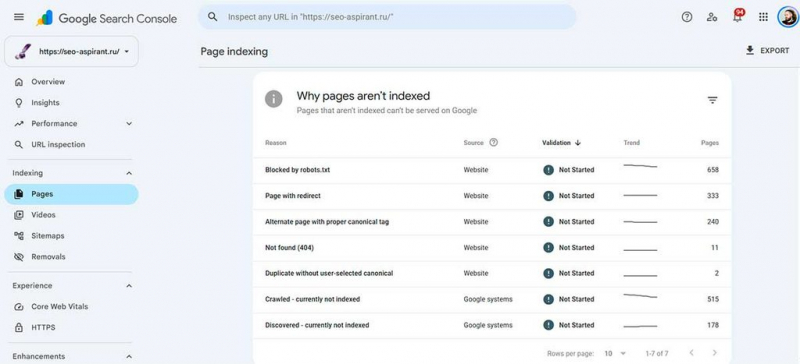
In addition, the URL verification tool in the Search Console allows you to find out which address Google has selected as the main version. If this address leads to someone else’s website, it’s worth investigating the situation.
Why is this important for SEO
Sometimes problems arise without any obvious signs on the site itself: for example, checking “confirm that you are not a robot” may be triggered at the CDN, hosting provider, or anti-bot system level, rather than on the pages themselves. Muller noted that such protection can be activated when the scanning intensity increases.
The request is successful, so the usual attempt to find a broken page will not help here. Since Google manages to access the site and get the correct response, the problem is that the search engine is not getting the content it expects. That is why the failure is not detected by checks that do not take into account what exactly Googlebot sees.
What to do next
If you encounter this problem, contact the specialists responsible for your security system, CDN or web hosting to find a solution. After fixing the problem, request a re-scan via the “Validate Fix” function in the Google Search Console. Google may discover the fix itself during the next scheduled scan.
Data source: